Your tax software stops at the return. Tax Nest handles everything after.
Wrap-up emails with results, milestone tracking, deadline reminders, invoices with online pay and marketing that brings clients back. Built for small and growing tax offices.
Windows 10 and 11 · Works with ProSeries, Lacerte, UltraTax CS, Drake, TaxSlayer Pro, ATX, TaxAct and CrossLink
The work every office does by hand, done for you.
Most offices finish a return, then switch to spreadsheets, sticky notes and personal email for everything else. Tax Nest picks up there.
Every return PDF, matched to the right client
Point Tax Nest at the folder your tax software saves to. It reads the file names, matches each return to the client once, and remembers it every season.
- Presets for eight tax programs, plus a pattern you can adjust
- Signature forms and filing copies are recognized and never emailed
- One shared folder per location, so every desk sees every return
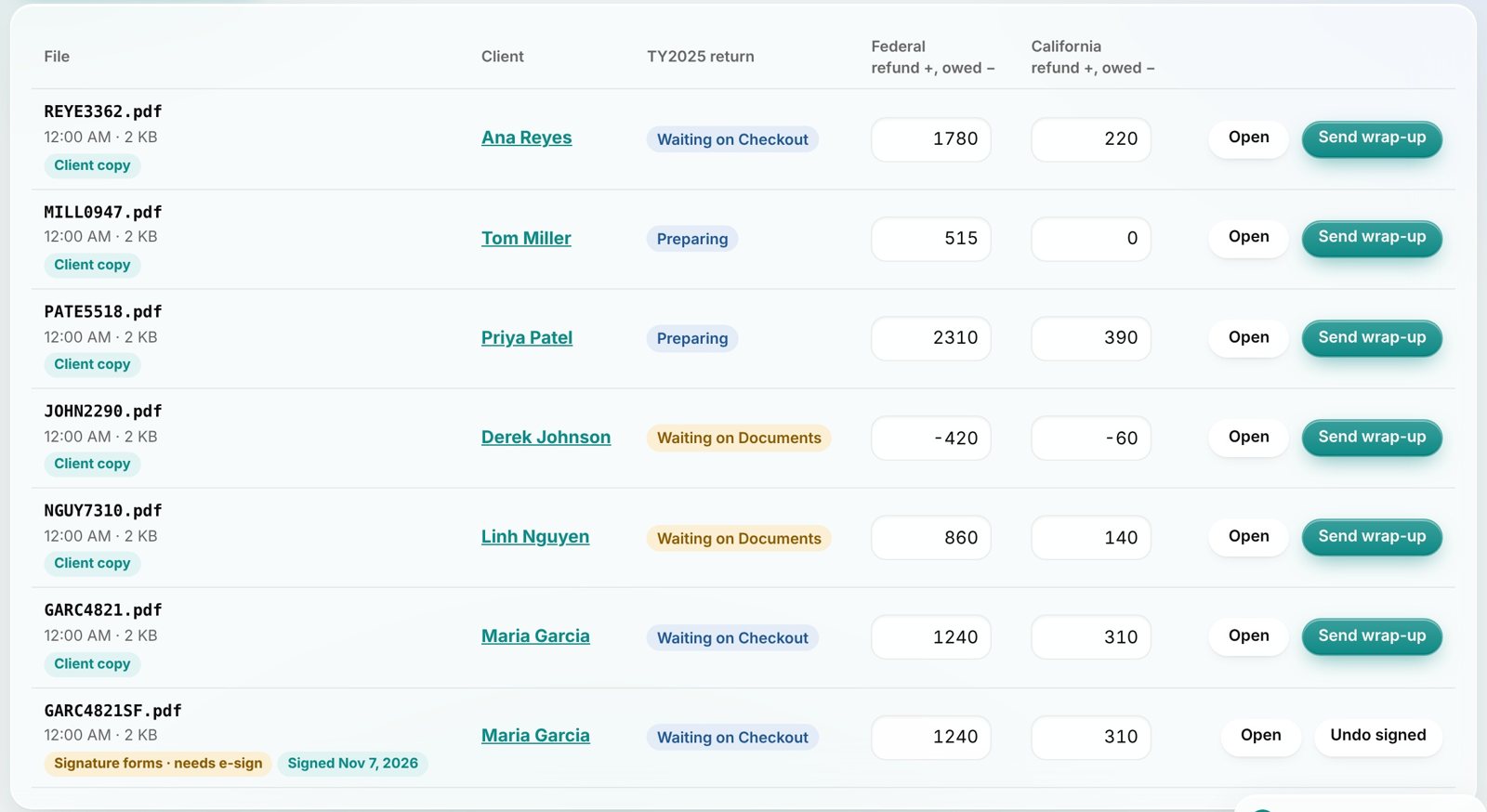
Wrap-ups with results and the return attached
One click sends a personal email with the federal and state results and the return. Before it goes, Tax Nest checks the client, the copy type, password protection and the signed 8879.
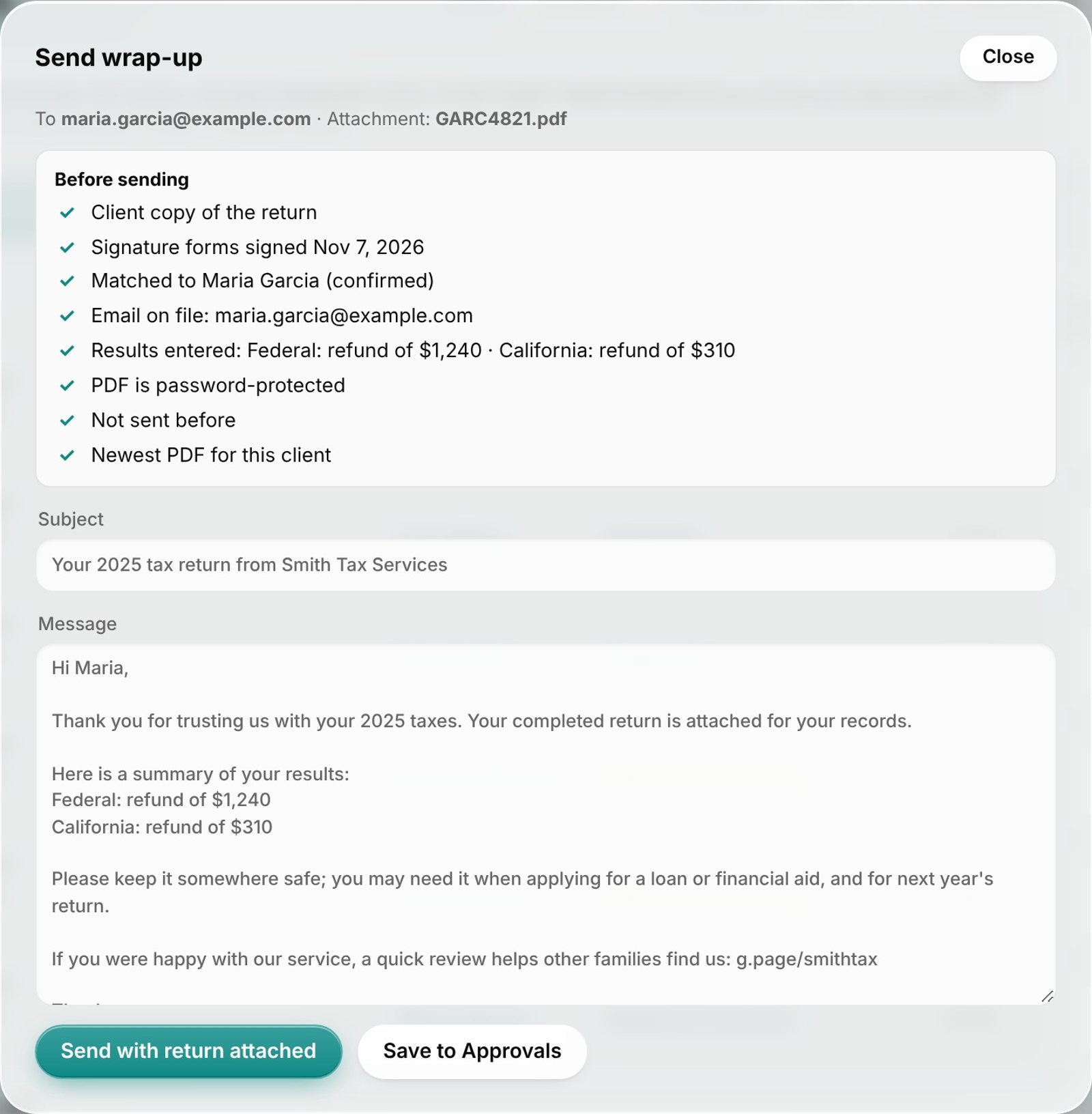
Every milestone of every return, tracked
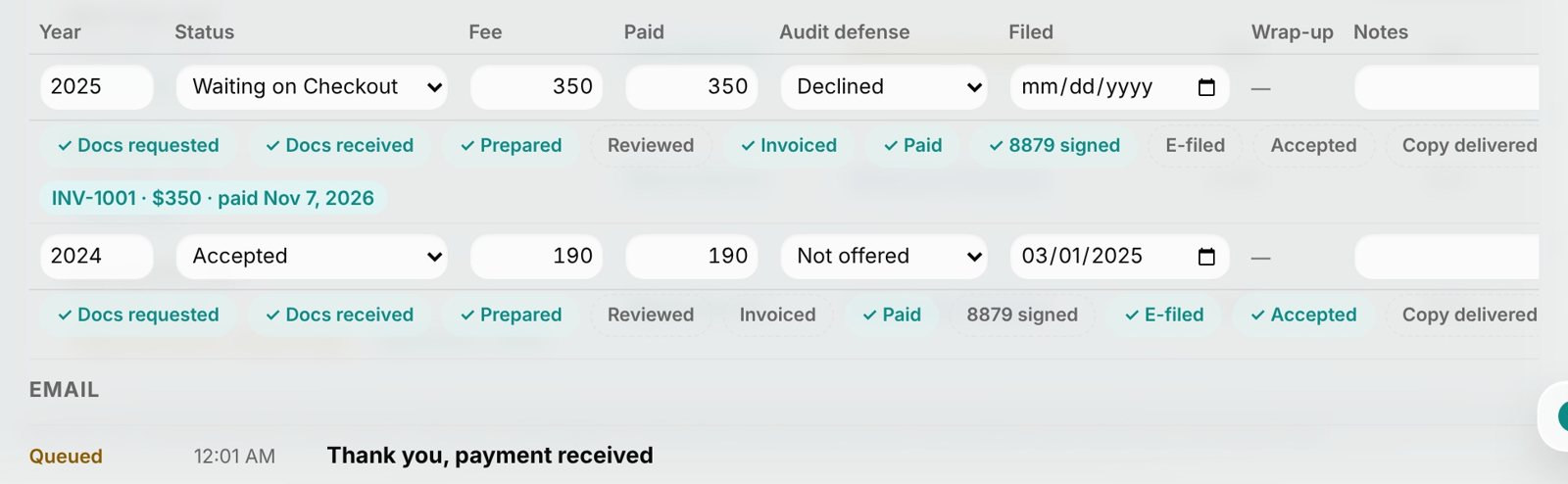
Docs requested, docs received, prepared, paid, 8879 signed, e-filed, accepted. One glance shows how far each return got, and most steps tick themselves as the work happens.
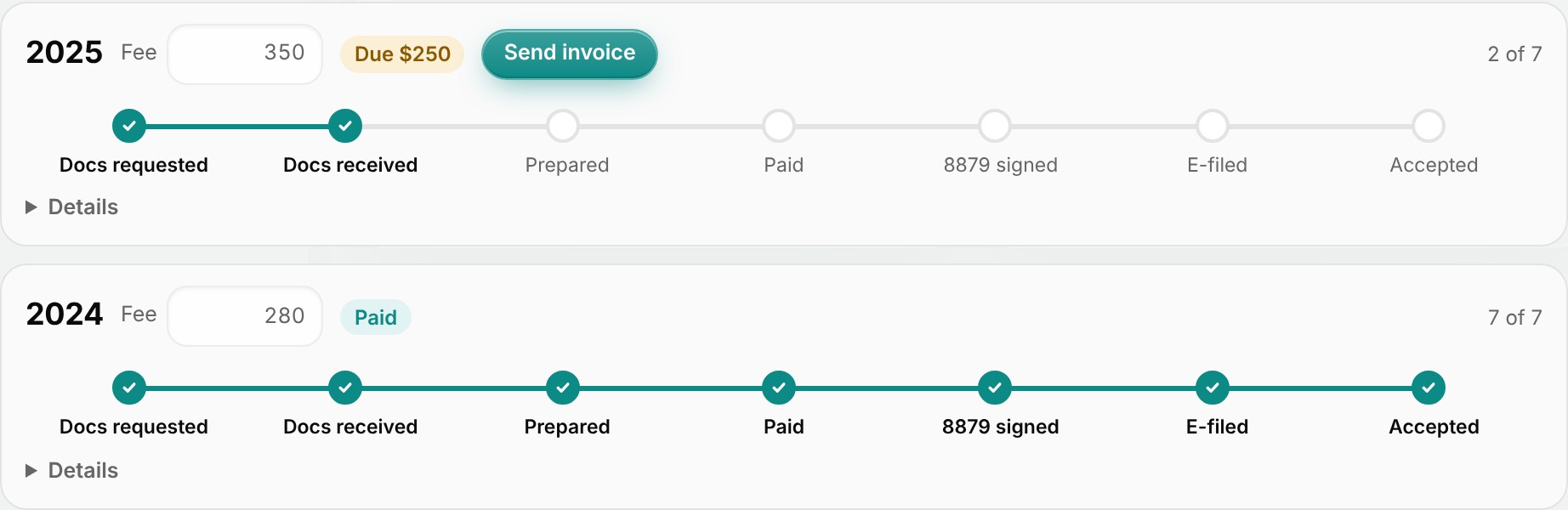
Send an invoice. Get paid online.
Invoices go out by email with a secure pay link. When the client pays, the payment is recorded on the return and a thank-you email goes out automatically.
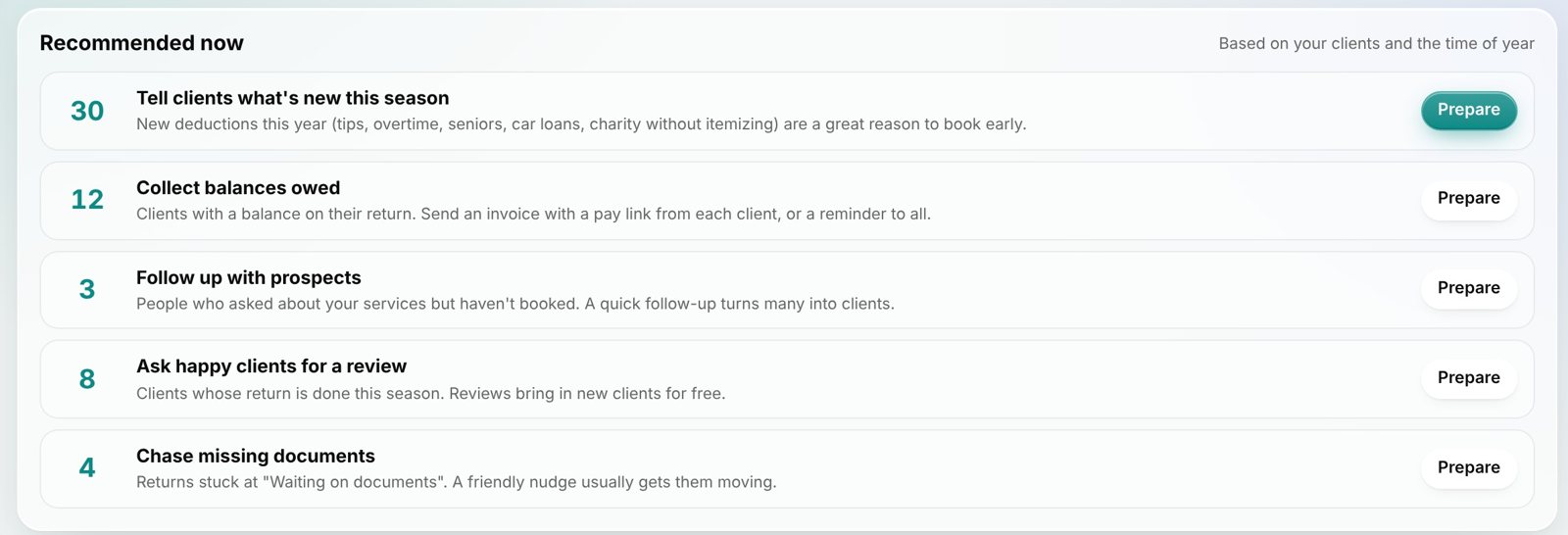
Know exactly who to contact, and when
Recommendations from your own clients and the tax calendar: who hasn't come back, who owes, who to ask for a review. Pick one, preview, send or schedule.
Reminders on autopilot
Missing documents, April 15, extensions and October 15. One reminder per client per day, never a blank field.
Income by tax year
Billed, collected, outstanding, average fee, new and returning clients, for each year and each location.
Tax updates built in
A season brief with the new figures and live IRS and state headlines, plus a ready-made "what's new" email.
Set up a location in an afternoon.
Tax Nest installs like any Windows program. A setup guide walks through every connection.
Pick each computer's role
One computer keeps the company file, like a QuickBooks server. Every other desk installs as a workstation and connects to it.
Tax software, Gmail and payments
Choose your tax program and its PDF folder, sign in to Google Workspace, and connect Stripe if you want online payments.
Bring your client list
Import your spreadsheet as it is. Tax Nest maps the columns, shows you a preview, and recommends your first campaign.
Your clients stay on your computers.
Tax Nest is not a cloud database. Client records are encrypted on your own PCs before they are saved anywhere, and each location has its own key.
- ✓Encrypted before it's savedAES-256, with a separate key for each location and personal sign-ins for each person.
- ✓No client data in our cloudUpdates and tax news come down to you; your client list never goes up to us.
- ✓Roles you controlAdmin, Manager, Preparer and Reception, with permissions an admin can adjust.
- ✓No SSNs storedTax Nest keeps contact details, fees and statuses. Tax data stays in your tax software.
Simple plans. Priced per office, not per seat.
Planned pricing at launch. Sign up to be notified when Tax Nest is available.
Solo
- 1 location, up to 2 people
- Return PDF matching and wrap-ups
- Milestones, reminders and deadlines
- Invoices and online payment
- Marketing campaigns and recommendations
Office
- 1 location, up to 8 people
- Everything in Solo
- Office server and workstations
- Roles and adjustable permissions
- Website analytics on your dashboard
Multi-location
- 3 locations, up to 20 people
- Everything in Office
- A separate encryption key per location
- Compare locations side by side
- Extra locations $49/month each
AI Enhanced
E-signature
Tax Nest Payments
Cloud practice-management tools often charge about $1,000 per person per year. An Office plan covers up to eight people for $1,068 a year.
Questions offices ask
Does Tax Nest replace my tax software?
No. Keep preparing returns in ProSeries, Lacerte, UltraTax CS, Drake or whatever you use. Tax Nest handles the client work around the return: matching PDFs, wrap-ups, reminders, invoices and marketing.
Where is my client data stored?
On your own computers, encrypted. Each location keeps its company file on its office server. Several locations can share it through Google Drive; only encrypted files travel between them.
Which email does it use?
Your own Google Workspace Gmail, so clients see your address and replies land in your inbox. Tax Nest only sends through it and never reads your inbox.
Can my front desk use it without seeing fees?
Yes. Reception can handle intake, contact details and email with money hidden. Admins can adjust what each role can do.
What do I need to run it?
Windows 10 or 11 on each computer and a Google Workspace account. For several desks, one computer acts as the office server during business hours.
When is Tax Nest available?
Tax Nest is in final testing with working tax offices. Leave your email and we'll let you know the moment it's ready, before anyone else.
Be the first to know when Tax Nest launches
Leave your email and we'll send one note when Tax Nest is ready to download. No spam, and you can unsubscribe anytime.